SAN JOSE, Calif.
Say What You Want, Get What You Meant
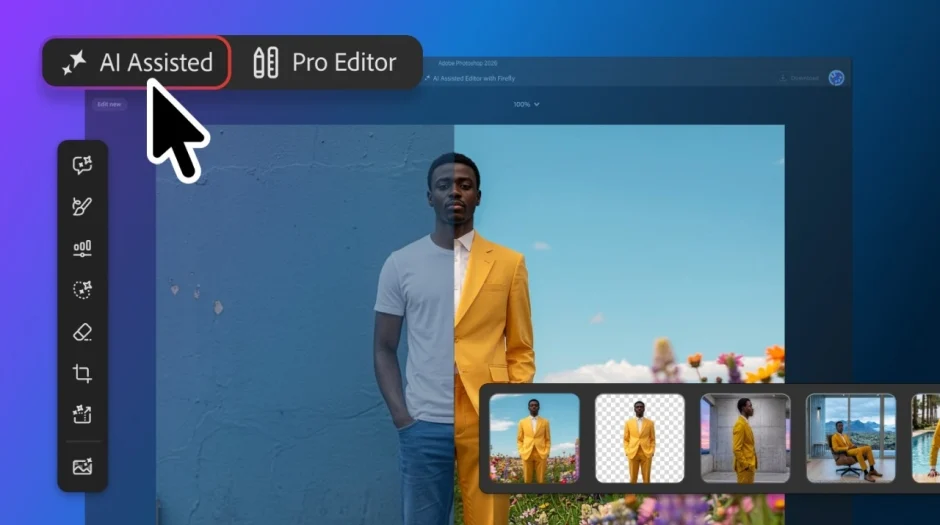
Adobe has spent the past few years teaching Photoshop to generate images from scratch. Its latest update, rolled out this month, is about teaching it to understand the images that are already there. The headline feature, Instruct Edit with Masks, powered by the newly integrated Firefly Image 5 model, lets users describe an edit in plain language — open a subject's closed eyes, swap a model's jacket, remove a stray object in the background — and have the software automatically identify, mask, and modify only the relevant area of the photo.
What distinguishes this from earlier generative-fill tools is precision and containment. Instruct Edit is built to understand the full context of a photograph before it touches a single pixel, and critically, it keeps generative changes strictly confined to the target zone. That means facial structure, brand logos, product packaging, and other foreground elements the software wasn't asked to touch stay untouched — a meaningful reliability upgrade for any professional who has watched an AI edit quietly warp a face or logo it wasn't supposed to go near.

Sketch It, Don't Say It
Alongside Instruct Edit, Adobe introduced AI Markup, a feature built less for solo editing and more for the messy, collaborative reality of how creative work actually gets made. Instead of typing out an edit request, users can circle an area that needs recoloring, draw an arrow toward something that needs changing, or rough out an idea directly on the image — and Firefly interprets those hand-drawn markings as instructions.
It's a small interface shift with outsized implications for teams. Creative direction has always involved this kind of shorthand — an art director circling a problem area on a printed proof, a client scrawling "make this bigger" in the margins of a mockup — and AI Markup essentially digitizes that workflow, letting the software act directly on annotations that would previously have required a human to interpret and execute manually.
Light Gets Its Own Layer
Not every headline feature in this update is AI-driven. Adobe also brought Camera Raw's non-destructive exposure tools — the kind of sliders long familiar to Lightroom users — directly into Photoshop as a new Light Adjustment Layer. It's a change photographers have requested for years: rather than baking exposure and tone adjustments into pixels, users can now stack light edits as an independent, fully reversible layer, editable at any point without degrading the underlying image.
It's a quieter feature than the AI headlines, but arguably one of the most practically useful additions in the release for working photographers and retouchers, who have long had to choose between Camera Raw's superior tonal tools and Photoshop's compositing power. Now they don't have to pick.
Built for Teams, Not Just Individuals
The update rounds out with a handful of workflow-focused additions: a Dynamic Text tool that lets type follow any custom path or shape rather than a straight line or fixed curve, and a new dockable Adobe Stock panel that surfaces stock imagery directly within the working canvas instead of requiring a separate browser trip. Neither is as flashy as Instruct Edit, but both point to the same underlying priority — reducing the number of times a user has to leave Photoshop, or hand a task off to someone else, to get a specific job done.
The Bigger Picture
Taken together, this release reflects a broader shift happening across the AI design tools landscape: the novelty phase of "type a prompt, get an image" is giving way to a more surgical phase, where AI is expected to understand existing context — an existing photo, an existing brand asset, an existing layout — and make targeted, controllable changes within it. That's a much harder problem than pure image generation, because it requires the model to respect boundaries the user didn't explicitly draw, like leaving a product's packaging or a face's proportions untouched.
It's also a competitive signal. As rival tools from Canva, Figma, and various AI-native startups race to add generative features, Adobe's update leans hard into precision and containment as its differentiator — betting that professional users, especially in advertising, e-commerce, and photography, will value control over raw generative novelty.

What This Means for You
If you use Photoshop professionally, this update is worth testing immediately — Instruct Edit and AI Markup could meaningfully cut down the time spent on tedious, repetitive retouching tasks like removing background objects or swapping small details across a batch of product photos. For creative teams, AI Markup in particular could change how feedback loops work, replacing rounds of written notes with direct on-image annotation that the software can act on.
For casual users and hobbyists, the practical upshot is simpler: photo editing that once required real skill — cleanly removing an object, adjusting just one person's expression in a group photo — is becoming accessible through plain description or a rough sketch, lowering the skill floor for edits that used to require real expertise.
The Bottom Line
Adobe's August update doesn't reinvent Photoshop so much as sharpen it — trading the earlier generation of AI tools' generative flash for something more useful to professionals: control. Between Instruct Edit's contained, context-aware changes, AI Markup's collaborative shorthand, and a genuinely overdue non-destructive light layer, this release makes the strongest case yet that AI in creative software is maturing from a novelty into infrastructure — the kind of tool upgrade that quietly reshapes daily workflows rather than grabbing headlines for a week and fading.
Published By | Features Editor